
Guide
How to cut no-shows without upsetting good customers
Most no-shows are people who forgot, not people who do not care. Fix the forgetting first, then put a deposit on the few appointments where an empty chair really hurts.
About 10 minutes 6 steps Updated
An empty hour you kept for somebody is money you cannot get back. But most people who miss an appointment did not decide to. They forgot, or something came up and ringing to cancel felt like a job for later. Only a few simply do not care.
So work in that order. Remind people properly. Make cancelling easy enough that they do it instead of just not coming. Then put a deposit and a clear policy on the appointments where an empty chair really hurts. Every step below is a setting in your account, shown on a demo hair salon.
Stop people forgetting
Send two reminders, not one
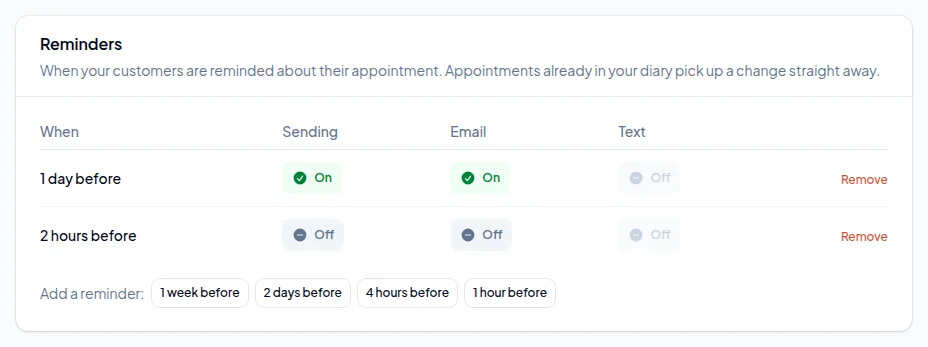
Go to Settings → Notifications and scroll to Reminders. Every account starts with an email reminder the day before, plus a two-hours-before reminder that is switched off. Switch that one on, or add a four-hours-before reminder if your mornings start early.
The day-before reminder gives people time to rearrange, so you can refill the slot. The same-day one catches the person who booked three weeks ago and has not thought about it since. You can add reminders from a week before down to an hour before, and a change applies to appointments already in the diary, not just new ones.
Use texts for the reminder that matters
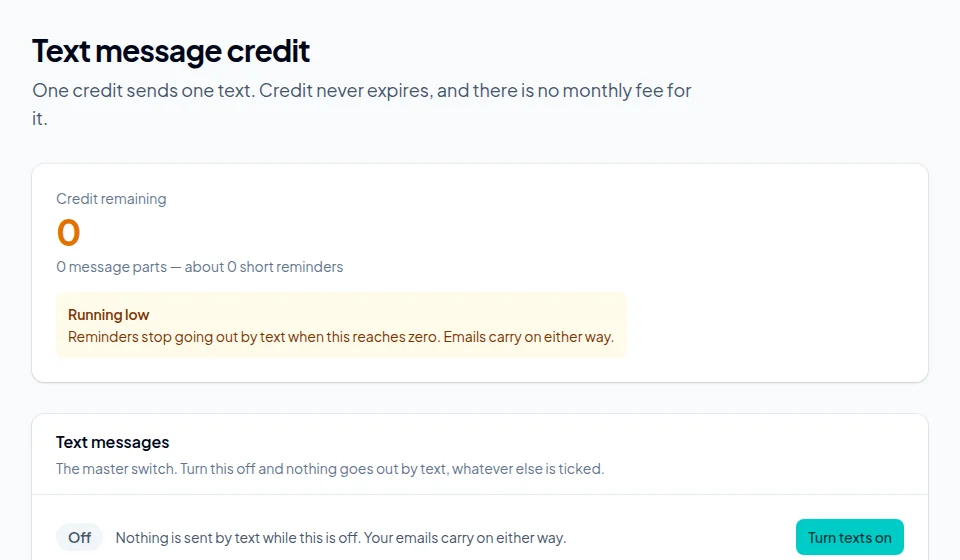
Email reminders are included in your plan. They work, but plenty of people only open their email once a day. A text on the morning of the appointment gets read. If you only pay for one text per booking, make it the same-day one.
Texts use credit you buy under Getting paid → Text message credit. There is no monthly fee and credit does not expire. Then switch the Text column on for the reminders you want sent by text.
Make cancelling easy
Let customers cancel or move online
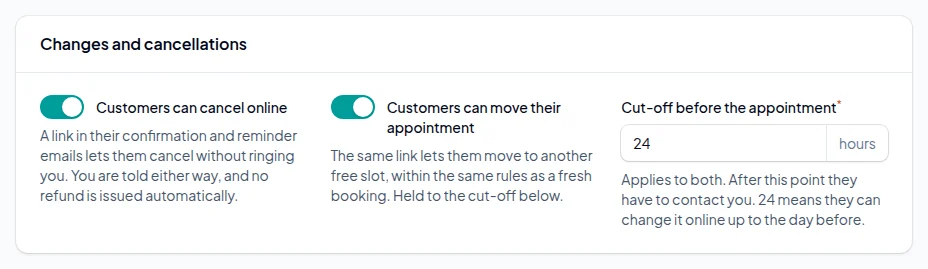
It sounds backwards, but it works. Somebody who has to ring you during opening hours to cancel will often put it off and then not turn up. Give them a link and they cancel on the bus, and you get the slot back while there is still time to fill it.
Under Settings → Booking rules → Changes and cancellations, switch on cancelling and moving online and set a cut-off. The link goes in every confirmation and reminder email. After the cut-off, they have to contact you.
Protect the appointments that matter
Take a deposit where an empty chair really costs you
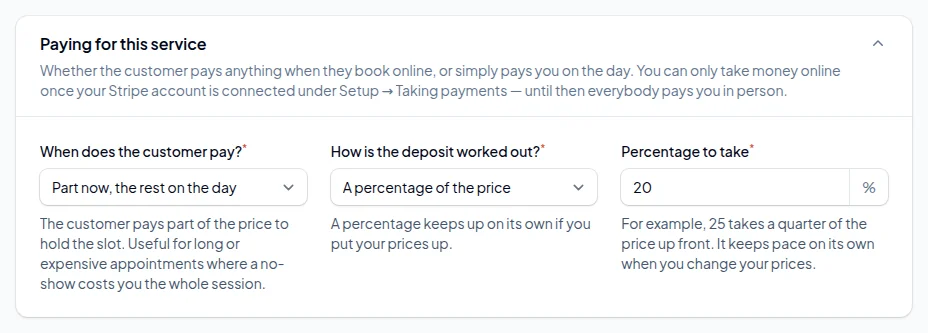
A no-show on a 20-minute trim is annoying. A no-show on a three-hour colour, a first appointment with a new client or a Saturday slot is a lost morning. Put a deposit on those and leave everything else alone.
On the service, under Paying for this service, choose Part now, the rest on the day. It needs your Stripe account connected first, and the money goes to you, not us. The deposits guide walks through it.
Write a cancellation policy people actually see
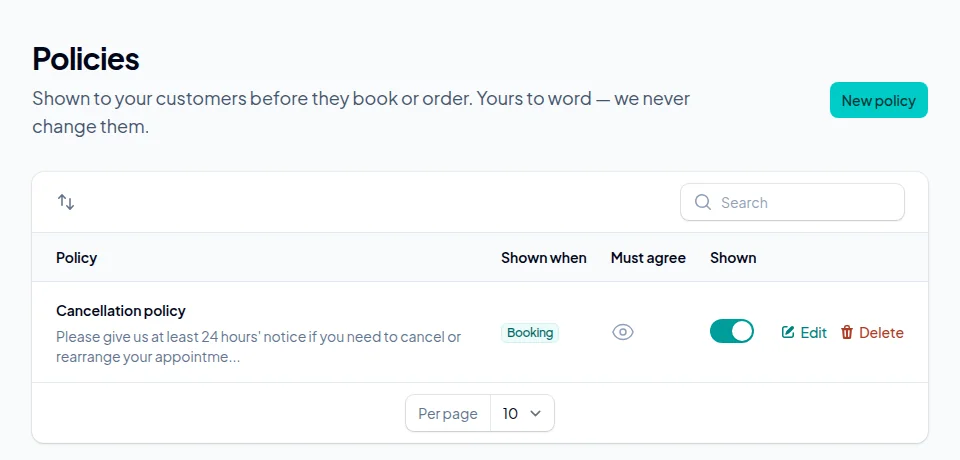
A policy buried in small print on your website does nothing. Under Settings → Your policies, add one and tick When booking an appointment, so it appears on the last step before the customer books.
For your cancellation policy, switch on The customer must tick to agree. They cannot finish booking without agreeing, and a dated record of the exact wording they agreed to is kept. That helps if you ever need to keep a deposit and they dispute it with their bank.
Keep it short and specific. For example: "Please give us 24 hours' notice to cancel or move your appointment. Deposits are not refunded for cancellations after that, or if you do not arrive."
Keep an eye on it
Mark no-shows, and look at who they are
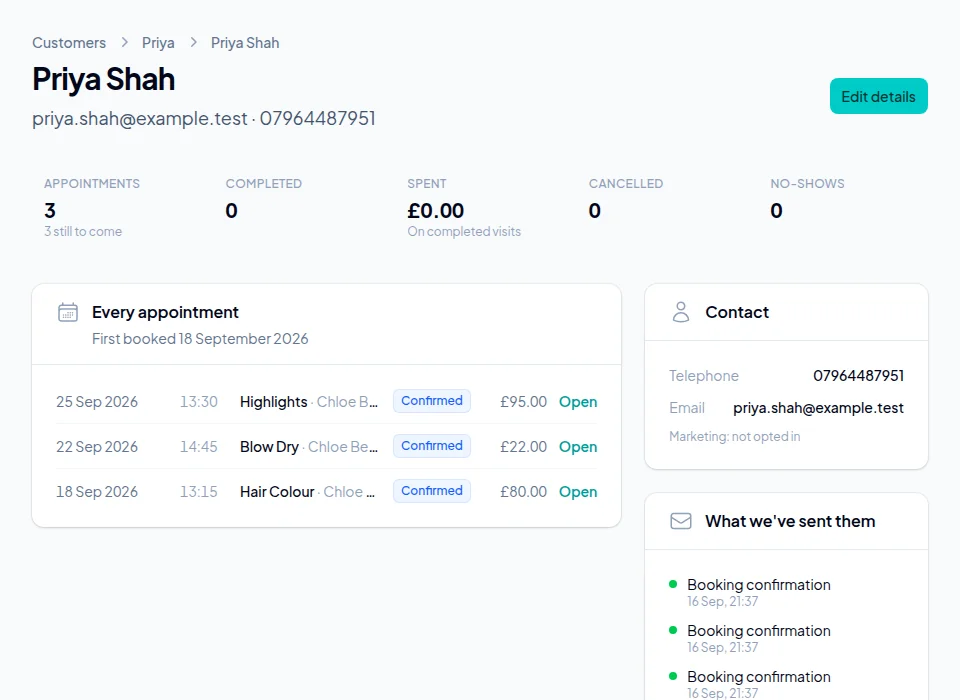
When somebody does not turn up, find the booking in your bookings list and choose Mark no show from its menu. It is recorded against the customer, and their record shows how many times they have cancelled or not shown.
Look before you act. If the same three names account for most of your no-shows, a private note on their record ("deposit for anything over an hour") will do more than a new rule for everyone. Reports shows no-shows and cancellations over time, so you can see whether a change actually helped.
Stuck on a step?
Talk to a person. Start a live chat, or email [email protected] and tell us which step you are on — we will help you finish it.
Common questions
Two reminders work better than one: the day before, so people can rearrange while you can still refill the slot, and a few hours before on the day for anybody who has simply forgotten.
Usually. A text tends to be read within minutes, while plenty of people only check email once a day. Email reminders are included; texts use credit you buy when you need it, with no monthly fee.
You may see more cancellations, but fewer no-shows, and a cancellation made the day before is a slot you can refill. You choose the cut-off, and after it they have to contact you.
Usually not. Deposits on short, cheap appointments put people off more than they protect you. Put them on long, expensive or first-time appointments, where one empty slot costs the most.
Not automatically. What you can do is take a deposit when they book and keep it under your cancellation policy, which the customer has ticked to agree to.
No. Their record shows how many times they have cancelled or not shown, and you decide what to do about it.
More guides
How to set up online booking for your business
Create your account, add your services and team, and get your booking page live. Every screen, in order, with screenshots.
How to set up class and group bookings
Weekly class times, places in each class, the list of who is coming, and what customers see when they book a place.
How to take deposits for appointments
Connect Stripe, choose a fixed or percentage deposit per service, and decide what happens to it when somebody cancels.
How to add a booking link to Instagram, Google, Facebook and your website
Your booking link on Google, in your Instagram bio, on your Facebook Page and on your own website, with a direct link for each service.
How to set staff hours, lunch breaks and holidays
Opening hours, who works when, split shifts, a lunch break that repeats every week, and holidays.
Ready to set yours up?
14 days free. No card required. Set up in an afternoon.
Claim your booking link
See if the address you want is free. No account, no card — it takes a second.
No card required · 14 days free · Your progress is saved, so you can stop and come back