
Guide
How to take deposits for appointments
On long or expensive appointments, a deposit is one of the best protections you have against no-shows. Here is how to set one up, what it costs you in card fees, and what your customer sees.
About 15 minutes 6 steps Updated
A deposit does two jobs. It makes a booking feel real to the person making it, and if they still do not turn up, you have been paid for some of the time you kept free. It is not worth taking on everything: nobody should pay upfront for a £12 fringe trim. It is worth it on anything long, expensive, or booked by somebody you have never met.
The money goes into your own Stripe account, not ours. We take no commission on it. Stripe charges its standard card fee, which for a standard UK card is 1.5% + 20p at the time of writing — so a £16 deposit costs you 44p.
This guide uses a hair salon with a 2-hour colour at £80 and a 20% deposit.
Connect Stripe
Open a Stripe account, if you have not got one
Stripe is the company that actually takes the card payment. Opening an account is free at stripe.com/gb. They will ask about your business and the bank account to pay you into, and they may ask for ID. That part is between you and Stripe, and we never see it.
Stripe usually pays out to your bank a few working days after a payment. You can see every payment, payout and refund in your Stripe dashboard.
Paste your two Stripe keys
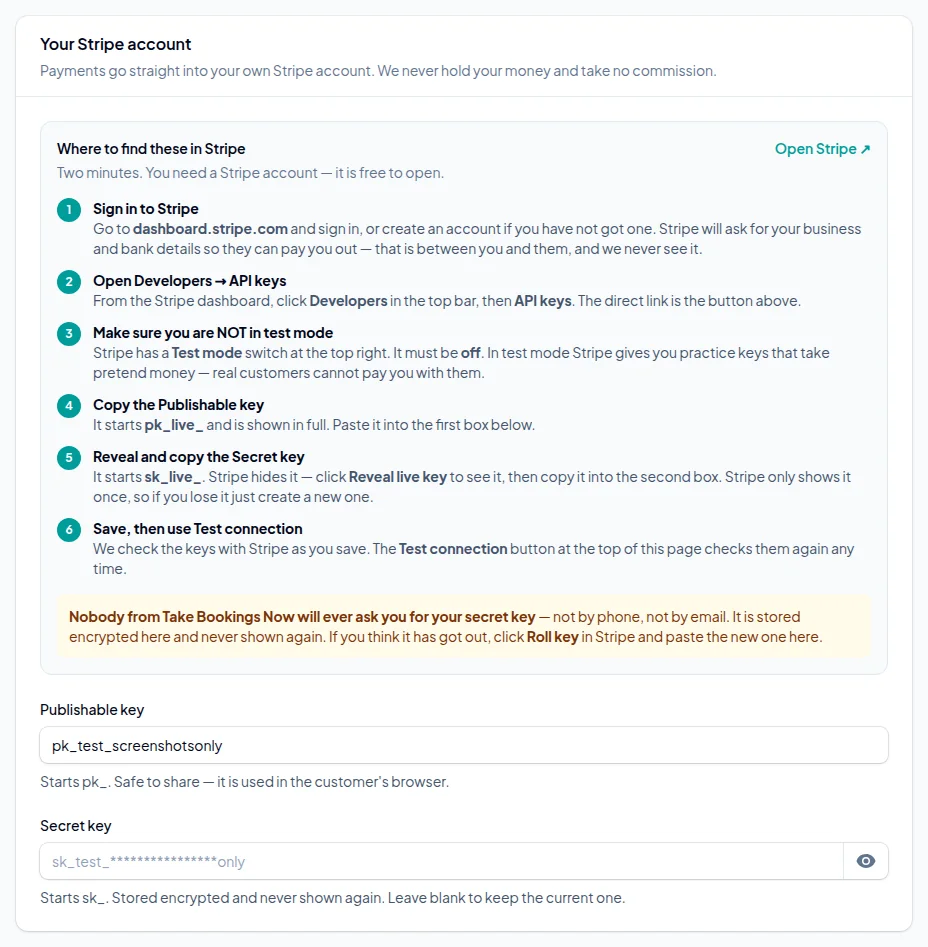
In your account, go to Getting paid → Taking payments and answer Yes — take deposits or full payment when somebody books. The page lists where to find your keys in Stripe: Developers → API keys.
Copy the Publishable key (it starts pk_live_) and the Secret key (it starts sk_live_) into the two boxes, switch on Take payments for online bookings and press Save and check. We test the keys with Stripe there and then, so you know straight away if one was copied wrong.
Choose what to charge
Put a deposit on the services that need one
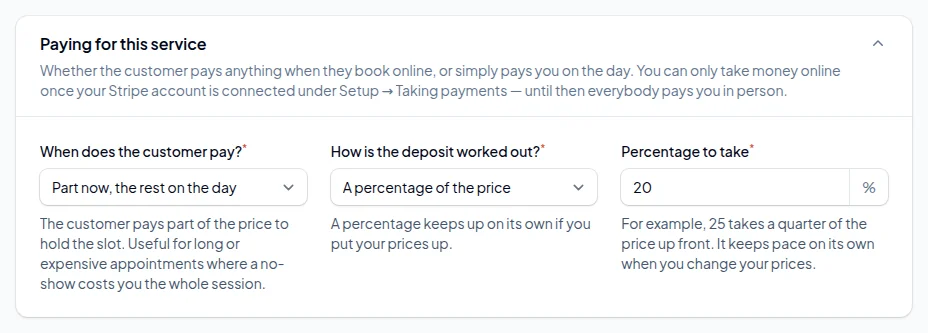
Open a service under Services and scroll to Paying for this service. Under When does the customer pay? choose Part now, the rest on the day, then choose a fixed amount or a percentage of the price.
A percentage is usually the better choice: put your prices up and the deposit follows. A deposit can never come to more than the service costs.
The other choices are On the day — nothing online and All of it when they book. Full payment suits things with a fixed price that people rarely change, like a course, a gift experience or a consultation.
Set a default for everything else
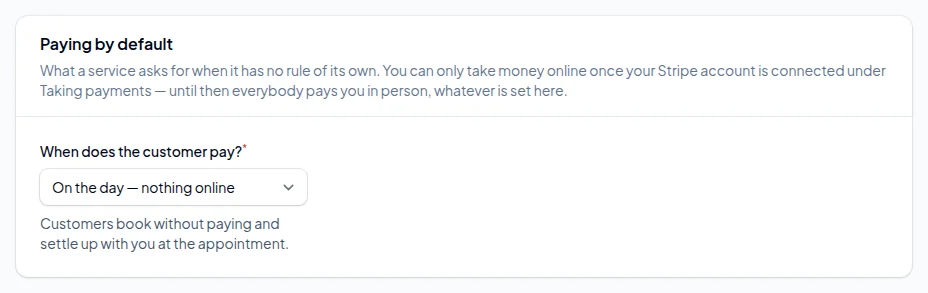
Services left on Same as the rest of my services follow the default under Settings → Booking rules → Paying by default. We suggest leaving the default on nothing online and switching deposits on service by service, so a quick blow-dry never asks for a card.
What happens next
What your customer sees
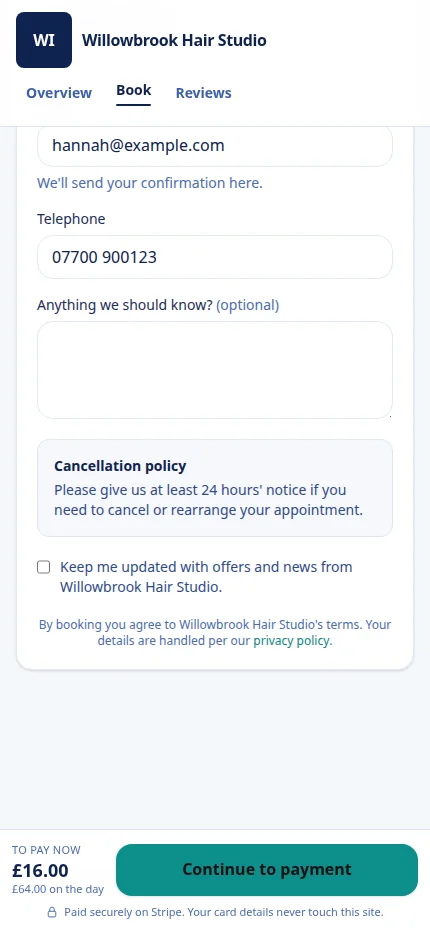
On the last step of booking, the customer sees exactly what they are paying now and what is left for the day: here, £16.00 now and £64.00 on the day. They pay on Stripe's own secure page, and card details never touch your booking page.
Their booking is only confirmed, and only then do you and they get a confirmation, once Stripe tells us the payment went through. If they give up at the payment page, the time is held for 15 minutes and then given back quietly. Nobody gets a confirmation for an appointment that was never paid for.
Bookings you add yourself in the diary are not asked for a deposit. Take one over the phone however you normally would.
Decide what happens when somebody cancels
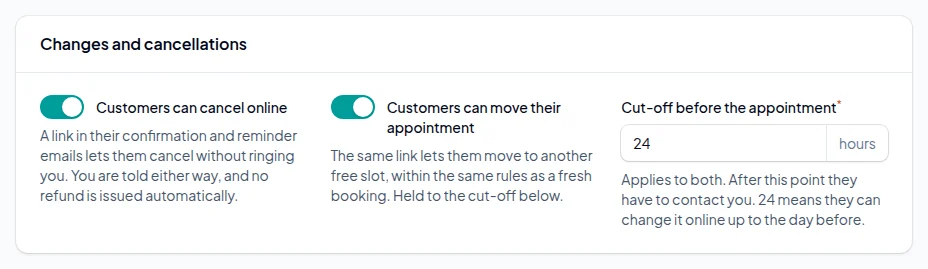
Under Settings → Booking rules → Changes and cancellations you choose whether customers can cancel or move a booking online and how late they can do it. After the cut-off they have to contact you.
No refund is ever issued automatically. A deposit often exists precisely so you can keep it when somebody cancels late, so that decision stays yours. When you do want to give money back, refund it from the booking, in full or in part. Refunds you make directly in Stripe show up against the booking within 15 minutes too.
Stuck on a step?
Talk to a person. Start a live chat, or email [email protected] and tell us which step you are on — we will help you finish it.
Common questions
No. Payments go straight into your own Stripe account and we take no commission. Stripe charges its own card fee, which for standard UK cards is 1.5% + 20p per payment at the time of writing.
Yes. Each service has its own rule: nothing online, part now, or all of it when they book. Anything you leave alone follows your default.
Either. A percentage keeps up when you change your prices; a fixed amount is easier to explain on a price list.
The time is held for 15 minutes while they pay. If the payment never arrives, the slot is released and nothing is booked, so neither of you gets a confirmation.
Yes. The deposit is worked out from the price after the discount, and the booking page shows the same figure that is taken.
Only if you refund it. Nothing is refunded automatically, and the page tells the customer that before they cancel. You can refund in full or in part from the booking.
Not for online deposits. Stripe is the only provider connected today. You can still take card payments in person on whatever terminal you already have.
More guides
How to set up online booking for your business
Create your account, add your services and team, and get your booking page live. Every screen, in order, with screenshots.
How to set up class and group bookings
Weekly class times, places in each class, the list of who is coming, and what customers see when they book a place.
How to cut no-shows without upsetting good customers
Reminders at the right time, texts for the people who ignore email, deposits where they matter, and a policy customers actually see.
How to add a booking link to Instagram, Google, Facebook and your website
Your booking link on Google, in your Instagram bio, on your Facebook Page and on your own website, with a direct link for each service.
How to set staff hours, lunch breaks and holidays
Opening hours, who works when, split shifts, a lunch break that repeats every week, and holidays.
Ready to set yours up?
14 days free. No card required. Set up in an afternoon.
Claim your booking link
See if the address you want is free. No account, no card — it takes a second.
No card required · 14 days free · Your progress is saved, so you can stop and come back